1. Pick a size
Blocks are square, so every Minecraft circle is a pattern of short straight runs and steps. The bigger the circle, the smoother it looks:
| Diameter | How it looks | Good for |
|---|---|---|
| Under 7 | A rounded square | Pillars, small details |
| 9 – 21 | Round, with few blocks | Towers, wells, round rooms |
| 31 – 61 | Smooth | Arenas, castle keeps, mob farms |
| 101+ | Very smooth | Walls around a base, lakes, giant rings |
Use an odd diameter if you can. An odd circle has a single center block, so it lines up neatly with doors, paths and pillars. An even circle, like 20, has a 2 × 2 center, which works too but is harder to count from.
2. Build a circle step by step
This example builds a 21-block circle. The same method works for any size; only the numbers change.
- Place the center block. Use something easy to see, like a block of white wool.
- Mark the four tips. From the center, count 10 blocks out to the north, south, east and west and place a marker at each spot. On an odd circle, the edge is always (diameter − 1) ÷ 2 blocks from the center block, so 10 for a 21-block circle.
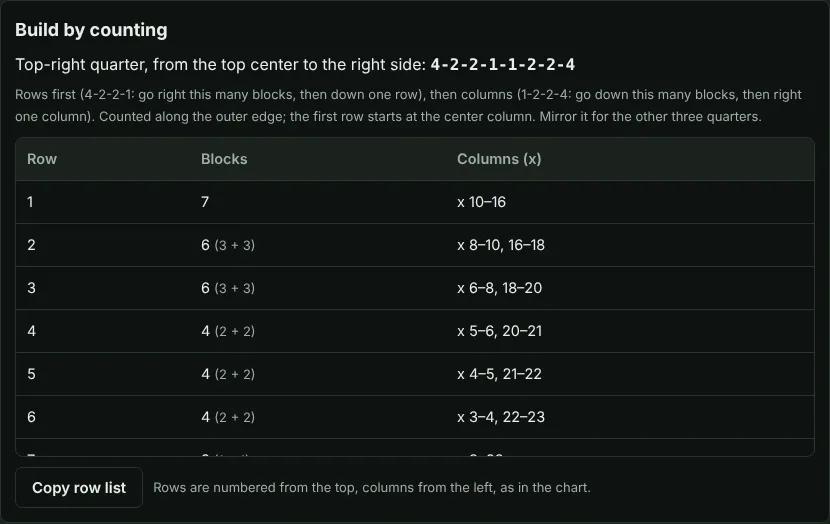
- Build one quarter with the step pattern. Stand at the north marker. The pattern for 21 is 4-2-1-1-1-2-4. The first numbers are rows: starting from the block in line with the center, place 4 blocks going east. Step one row south and one column east, and place the next 2 going east, then 1, then 1. Past the 45-degree point the numbers count columns instead: each run goes south, and you step one column east and one row south before the next one. Place 1, then 2, then 4. The last run ends at the east marker. For the thick style, also fill the inside corner at every step.
- Mirror it three times. Repeat the pattern from the east marker going south, from the south marker going west, and from the west marker going north.
- Check it from above. Fly up or pillar up and look down. If one quarter looks flatter than the others, a run was miscounted.
You don't need to work the pattern out yourself. Set any diameter in the circle generator and the Build by counting box under the chart lists the pattern for the top-right quarter. It also lists every row with its block count and exact columns.
3. Step patterns for common sizes
All numbers come from our circle generator. The pattern is the same for thin, thick and filled circles because it follows the outer edge; only the total changes.
| Diameter | Quarter pattern | Thin | Thick | Filled |
|---|---|---|---|---|
| 7 | 2-1-2 | 16 | 24 | 37 |
| 9 | 3-1-3 | 24 | 32 | 69 |
| 11 | 3-1-1-3 | 28 | 40 | 97 |
| 13 | 3-2-2-3 | 36 | 48 | 137 |
| 15 | 3-2-1-2-3 | 40 | 56 | 177 |
| 17 | 3-2-2-1-2-3 | 48 | 64 | 225 |
| 19 | 4-2-1-1-2-4 | 52 | 72 | 293 |
| 21 | 4-2-1-1-1-2-4 | 56 | 80 | 349 |
| 25 | 4-2-2-1-1-2-2-4 | 68 | 96 | 489 |
| 31 | 4-3-2-1-1-1-1-2-3-4 | 84 | 120 | 749 |
| 41 | 5-3-2-2-1-1-1-1-1-2-2-3-5 | 112 | 160 | 1,313 |
A quick check for the thick style: it always uses 4 × (diameter − 1) blocks, so a 31-block thick circle needs 120. To turn a total into stacks and shulker boxes, paste it into the stack calculator.
4. Thin, thick or filled
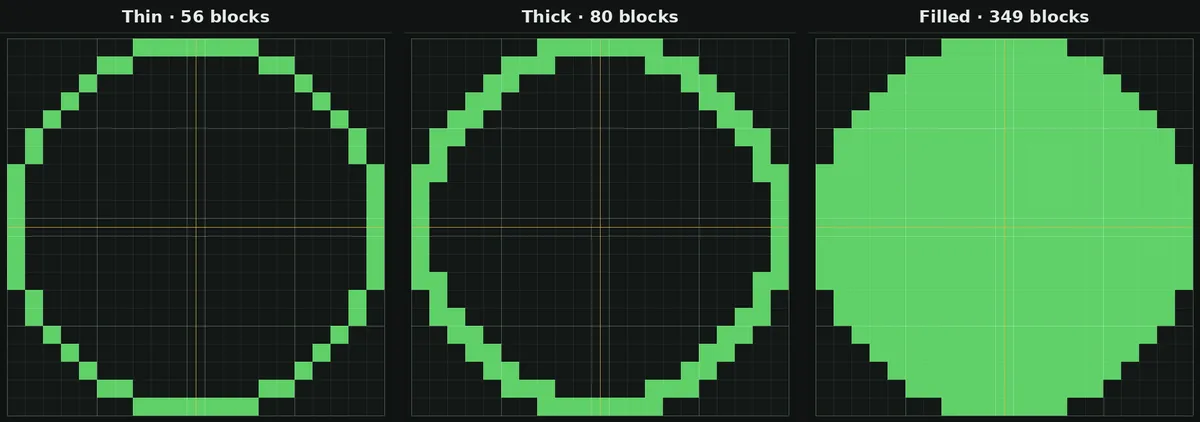
- Thin uses the fewest blocks. Where the edge steps diagonally, blocks only touch at their corners. That still stops players, mobs and water, but the wall looks jagged from inside. Good for floors, paths and outlines.
- Thick adds a block on the inside of each diagonal step, so every block touches its neighbors by a full side. It looks more solid, especially on tall walls and towers.
- Filled is a solid disc for floors, roofs, ponds and platforms. Build the outline first, then fill it row by row using the row table in the generator.
5. Ovals and wide rings
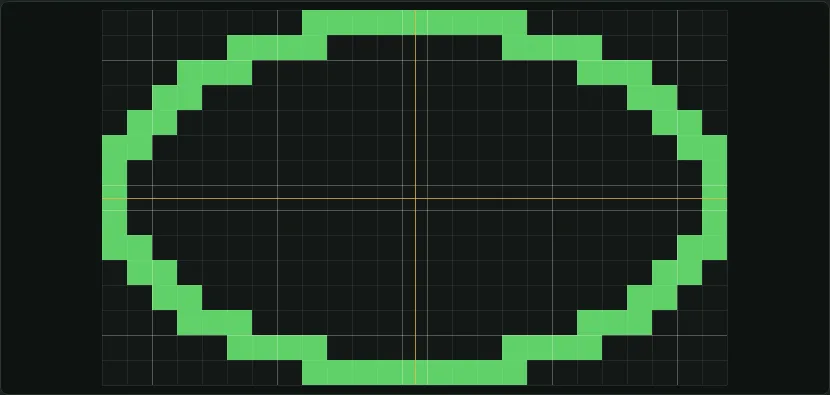
An oval is a circle with a different width and height. In the circle generator, untick Same width and height and enter both. A 25 × 15 thick oval uses 76 blocks and reads 5-3-2-1-1-3. The row part (5-3-2-1) and the column part (1-3) differ, because the curve is flatter along the long side, so build each quarter carefully and mirror it.
For a wall you can walk on, a moat or a road around a base, raise Ring thickness (1 to 10 blocks). A 21-block thick circle uses 80 blocks with a 1-block ring, 128 with a 2-block ring and 188 with a 3-block ring.
For a half circle over a door, gate or bridge, the arch generator draws round and elliptical arches with row counts.
6. Going up: towers, domes and spheres
- Round towers: repeat the same circle on every layer. The sphere generator has a Cylinder shape that does this for you. A 15-wide, 20-high hollow tower takes 800 blocks, or 1,074 with a floor and roof.
- Domes: a dome changes the circle on every layer. Build the walls with the circle generator, then put a dome of the same diameter on top; its widest layer has the same outline as a thin circle of that size. The dome building guide covers it layer by layer.
- Spheres: a sphere is as tall as it is wide, and each layer is a circle of a different size. Use the sphere generator's layer slider and build from the bottom up.
If you'd rather not count at all, the circle generator can also download the circle as a .litematic file for Litematica, a .schem file for WorldEdit, a .mcfunction file for vanilla data packs, or a .mcstructure file for Bedrock. Set a height above 1 to get a round wall in one go.
7. Common mistakes
- Counting from the wrong block. The first run of the pattern starts at the block in line with the center, not next to it.
- Forgetting to mirror. Each quarter runs in its own direction. Turn to face the next marker before you start counting again.
- An even size by accident. If your center ends up as a 2 × 2 square, the diameter is even. That's fine, but use the even pattern, not the odd one.
- Comparing with other tools. Our generator places a block when the center of that block is inside the ideal circle. Other generators may round differently, so edges can differ by one block. Stick to one chart for the whole build.